

Your Page and the Result, Side by Side
Your original page sits next to the redrawn score, bar for bar. Spot a wrong note before your sheet music to MIDI file lands in your DAW, not after.
No install, no daily import limit: drop in a PDF or photo, play it back, and download MIDI and MusicXML in under a minute.
Your score, a piano roll you can play, and MIDI plus MusicXML files
Most sheet music to MIDI tools hand you a file and hope for the best. Here you see the result first.
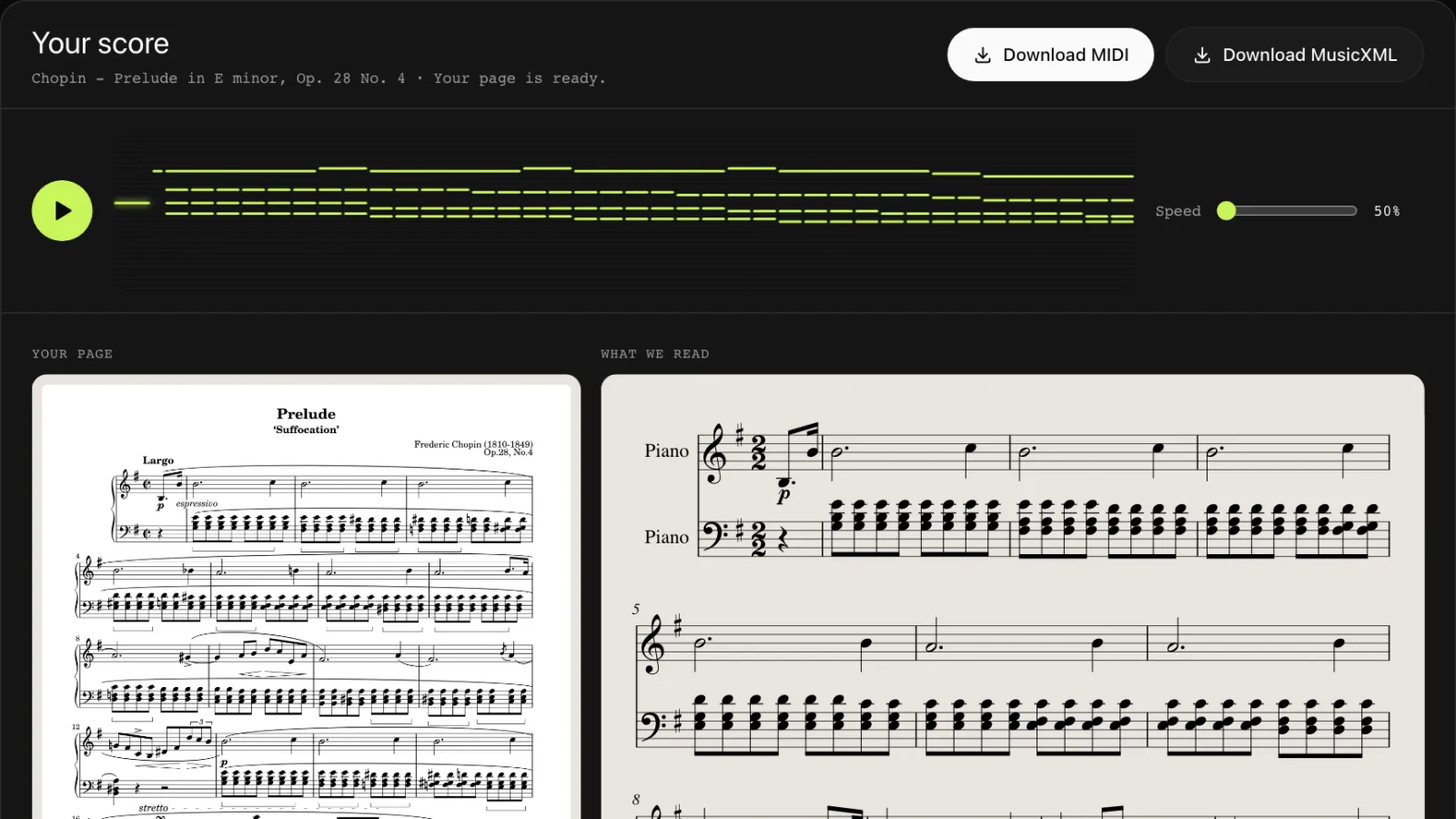
Your original page sits next to the redrawn score, bar for bar. Spot a wrong note before your sheet music to MIDI file lands in your DAW, not after.
Press play and the piano roll lights up note by note, so every sheet music to MIDI result is heard before you save it. Slow it down to 50% to learn a tricky rhythm, then speed it back up.
Every sheet music to MIDI conversion gives you both files. Use the MIDI in Logic, Ableton, GarageBand or Synthesia; open the MusicXML in MuseScore, Sibelius or Dorico to edit.
Sheet music to MIDI without retyping a single note: here is the whole process.
Drop in a PDF, a scan, or a phone photo. For multi-page PDFs, pick the pages you need and see the page count before you start.
Our sheet music to MIDI reader checks pitches, rhythms, key and time signatures, ties and accidentals page by page. A typical page takes about 20 seconds.
Listen, compare it with your page, then download MIDI and MusicXML. Your sheet music to MIDI files stay in your history for 7 days.
Call it sheet music to MIDI or music sheet to MIDI, the job is the same: hear the page, practice with it, or produce from it.
Got this week's anthem as a PDF? Convert it, play it back, and rehearse your line at half speed until it sticks.
Turn a lesson book page into MIDI for Synthesia, Piano Marvel or your keyboard's learning mode, and hear how it should sound before practice.
Use sheet music to MIDI to bring an old score or a band part into your DAW and start arranging, instead of playing every line in by hand.
Short answers to what people ask before they trust a sheet music to MIDI tool with their scores.
Only you can see your uploads and results, and we never use them to train recognition models. Uploaded pages are deleted within 24 hours, results after 7 days, and you can delete them sooner.
Standard MIDI and MusicXML with no watermark, ready for any DAW or notation app. You need the right to use the music you upload.
Sign up with Google or email and get 3 free pages, one bonus per person with a daily limit. Pages that fail to convert are refunded.
Clear printed staff notation gives the best sheet music to MIDI results. Handwritten scores, guitar tabs and dense orchestral scores may come out with errors.
FAQ
Your first 3 pages are free when you sign up. After that, a page costs one credit. Credit packs start at $4.99 for 15 pages, which works out to 20 to 33 cents a page, and pack credits last 12 months. Subscriptions start at $4 a month billed yearly and cost less per page if you convert every week.
We tested our sheet music to MIDI conversion on real scores: four engraved public-domain pieces, two scanned pages from an 1880s edition, and two phone photos. It found 99.8% to 100% of the pitches and matched 98% to 100% of the rhythms. Small print, heavy shadows and handwriting lower the score.
Yes. We tested 7 engraved piano and keyboard pieces, 19 pages in all. Both staves were read on every page, and the MIDI keeps the right and left hands on separate tracks. Bach's C major prelude and first invention, a four-part Bach chorale and Chopin's E minor prelude came out at 97% to 100% of the notes, and the chorale kept its separate voices in the MusicXML. Für Elise, a Beethoven sonata and a Chopin nocturne, with fast runs and ornaments, came out at 86% to 94%, so play those back before you rely on them.
Both. PDF to MIDI works for files exported from notation software and for scanned PDFs. Photos in JPG or PNG work too, and on a phone you can take the picture right from the upload box.
No. It is a sheet music scanner and sheet music to MIDI tool that runs in your browser on a phone, tablet or computer. Nothing to install, and your history follows your account across devices.
Drag the .mid file into Logic, Ableton, GarageBand, FL Studio or Synthesia. For MuseScore, open the .musicxml file instead: it keeps the clefs, key, dynamics and layout that MIDI leaves out.
The credit for that page comes back to your account automatically, and the rest of your sheet music to MIDI job still finishes. Retake the photo straight on, in good light, with the whole staff in frame.
Upload a page now and hear your sheet music to MIDI result in under a minute. Your first 3 pages are free.
Convert Sheet Music