Pick the Pages That Matter
Leave out the cover, the lyric sheet or the blank last page. Only ticked pages are read and charged, and the page count shows before the PDF to MIDI conversion starts.
Skip the page-one limit: pick up to 20 pages of a PDF, hear them play, and download one joined MIDI and MusicXML.
The pages you pick, joined into one MIDI file you can play
Tick the pages you need, then compare each PDF to MIDI page with the redrawn score and the piano roll before you download.
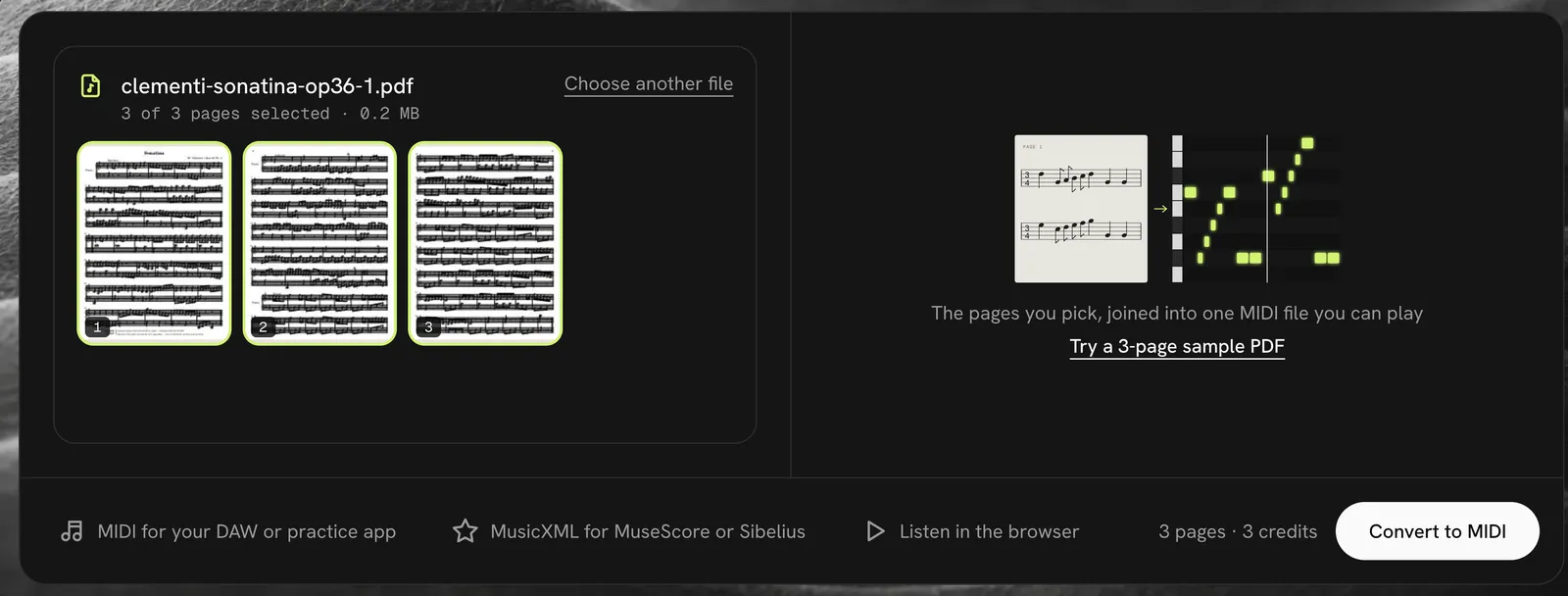
Leave out the cover, the lyric sheet or the blank last page. Only ticked pages are read and charged, and the page count shows before the PDF to MIDI conversion starts.
Pages are joined in order, so the bars of page two follow page one without a break. Our sample came back as 135 bars in a single PDF to MIDI file.
Piano PDFs come out with the right and left hand as separate MIDI tracks, so you can mute one hand while you practice the other.
No software to install and no export menus. This is the whole PDF to MIDI process, start to finish.
Drag in a PDF saved from notation software or a scanned book, up to 20 pages and 25 MB.
Untick the pages you don't need and check the count. PDF to MIDI takes about 20 seconds a page.
Hear the result at 50% to 150% speed, compare it with your pages, then download MIDI and MusicXML.
Every file goes through the same reader as our sheet music to MIDI converter, so the print matters more than the file.
Files exported from MuseScore, Sibelius, Finale, Dorico or LilyPond have crisp, evenly spaced notes. They are the easiest PDF to MIDI job: our 3-page test kept 99.9% of the notes.
PDF to MIDI works on scans of older engraved editions when the staff lines are straight and sharp. Two scanned pages from an 1880s edition kept 99.8% or more of their pitches in our launch tests.
Piano scores, choir parts and single-line parts read best. Dense orchestral scores, guitar tab and handwriting often come back with missing or wrong notes.
Four things we saw while converting real PDF sheet music to MIDI, with the numbers from our tests.
One PDF can have up to 20 pages and 25 MB. For a longer book, save each movement or song as its own file and convert each PDF to MIDI in turn.
The MIDI plays each repeated section once, as printed. Where a repeat sign fell in the middle of a line, our sample gained one empty bar; delete it in your DAW.
Our sample moves from 2/2 to 3/4 to 3/8 and from C to F major and back. Each movement kept its own time and key signature in the MIDI.
If a page can't be read, its credit comes back automatically and the rest of your PDF to MIDI job still finishes. Try a sharper copy of that page.
FAQ
Yes, your first 3 pages are free when you sign up, so a short piece costs nothing. After that a page is one credit. Credit packs start at $4.99 for 15 pages, about 33 cents a page, and pages that fail are refunded.
This PDF to MIDI tool runs in your browser on a computer, tablet or phone, with nothing to install. Your conversions stay in your account history for 7 days, so you can open them again on another device.
Yes, when the scan is sharp and straight. Clean scans of engraved music go through PDF to MIDI almost as well as exported files. Crooked, faded or tiny print loses notes first, so play the result back before you rely on it.
Drop the whole PDF, up to 20 pages, and untick the ones you don't need. The pages you keep are read one by one and joined into a single MIDI and MusicXML file, with bar numbers running straight through.
Notes, rhythms, time signatures and key changes carry over, and piano music keeps each hand on its own track. The MIDI plays at a steady 120 beats per minute, so set the speed you want in the player or your DAW.
That works too. JPG and PNG photos go through the same reader, and on a phone you can take the picture from the upload box. Our sheet music scanner page shows how a tilted, shadowed photo held up.
Drop the file, pick the pages and hear your PDF to MIDI result in about a minute. Your first 3 pages are free.
Convert a PDF