
Four Voices Stay Apart
In a four-part chorale, the PDF to MusicXML file keeps soprano and alto as two voices on the top staff and tenor and bass on the bottom, each with its own stems and rhythms.
Turn a printed score into a file MuseScore, Sibelius, Dorico or Finale can open, with each voice kept on its own line.
Your PDF to MusicXML result: an editable score, plus a MIDI
The redrawn score beside your page is drawn from the PDF to MusicXML file itself, so you see what your notation app will open.
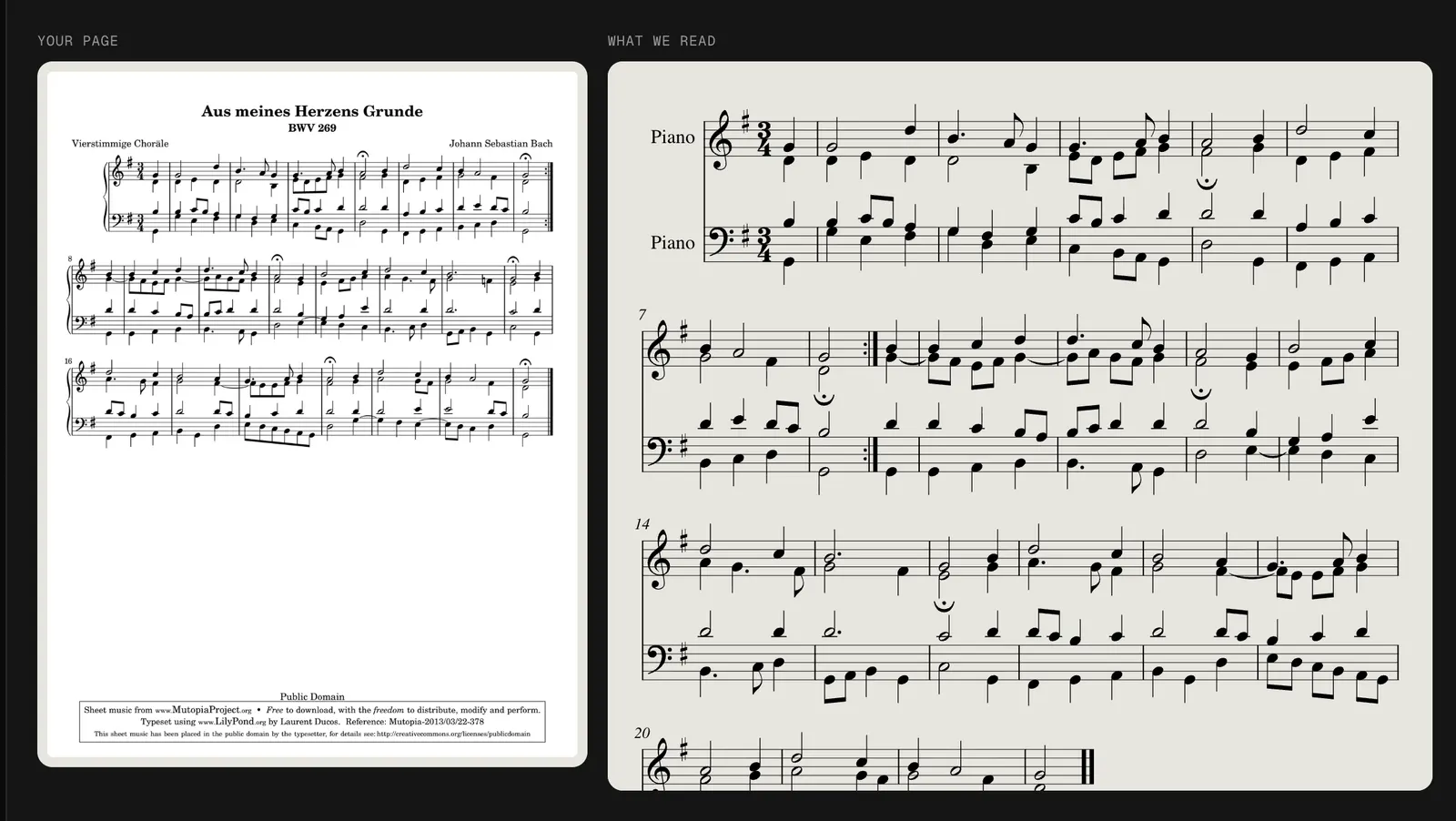
In a four-part chorale, the PDF to MusicXML file keeps soprano and alto as two voices on the top staff and tenor and bass on the bottom, each with its own stems and rhythms.
Clefs, key and time signatures, ties, beams, fermatas, repeat barlines and dynamics such as p come through. Our chorale kept all 6 of its fermatas and its repeat sign.
Lyrics, fingering, pedal marks and tempo words such as ritard. are not in the PDF to MusicXML file, and slurs only sometimes. Plan a few minutes in your editor for those.
No desktop recognition program to install. This is the whole PDF to MusicXML process, from file to editable score.
Use a PDF exported from notation software or a clean scan, up to 20 pages and 25 MB. Untick any cover or lyric pages.
Press Convert. PDF to MusicXML takes about 20 seconds a page; then play the score back and compare each bar with your page.
Download the PDF to MusicXML file (.musicxml) and open it in your notation app. A MIDI of the same notes comes with it.
Each file goes through the same reader as our sheet music to MIDI converter, so clean printed notation gives the cleanest MusicXML.
Four-part writing on two staves converts well: the chorale in our test kept 97.8% of its notes and every voice. Arrangers can pull out one part or transpose for another group.
Crowded old layouts come out of PDF to MusicXML as clean, evenly spaced notation. Enlarge the print for a student, change the page size or fix a misprint, then print again.
Straight, sharp scans of engraved music work. Handwriting, guitar tab and dense orchestral scores come back with missing or wrong notes, so a PDF to MusicXML file of those needs real cleanup.
What we saw when we opened real PDF to MusicXML results, with the numbers from our November 2026 tests.
Each staff of a piano or choir score arrives in the PDF to MusicXML file as its own part. If your editor lists two piano instruments, merge them into one grand staff or keep them apart to print.
PDF to MusicXML writes repeats once, as printed, so the layout stays clean for printing. Unfold them in your editor only when you need a playback track.
In a Schumann piece with triplets in both hands, 97% of the pitches were right but 17 of 22 bars had the wrong length. Compare those bars with your PDF first.
The title in your MusicXML comes from your file name and the composer field is left empty. A clear file name saves a step in your editor.
FAQ
Yes. Your first 3 pages are free when you sign up, which covers most hymns, chorales and short pieces. After that a page is one credit, about 20 to 33 cents with credit packs, and failed pages are refunded.
MusicXML is the format notation programs share, so MuseScore, Sibelius, Dorico and Finale all open it. The file is MusicXML 4.0 with a .musicxml extension.
It does the job in the browser with nothing to install. You see the redrawn score and can hear it before you download, so you know whether a page needs a better scan.
Not yet. Lyrics, fingering and pedal marks are left out, so add them in your editor. Notes, rests, rhythms, keys, meters, ties, fermatas and dynamics are kept.
Yes. Every conversion gives you both files from the same reading. Use the MusicXML to edit and print and the MIDI for a DAW; our PDF to MIDI page covers long multi-page files.
A photo goes through the same reader and gives the same kind of MusicXML. Shoot straight on in even light; our sheet music scanner page shows a tilted, shadowed photo that still matched every note.
Drop the score, check the redrawn bars and open your PDF to MusicXML file a minute later. Your first 3 pages are free.
Convert a PDF