

A Little Tilt and Shadow Are Fine
The sheet music scanner still reads pages shot at a slight angle or with a hand's shadow on one side. In our test, the tilted photo and the flat PDF gave note for note the same result.
No app to install: snap a printed page with your phone, hear it play in the browser, and save it as MIDI or MusicXML.
Your photo beside the redrawn score, with a piano roll to play
A music sheet scanner is only useful if you can check what it read, so your photo sits beside the redrawn score, bar for bar.
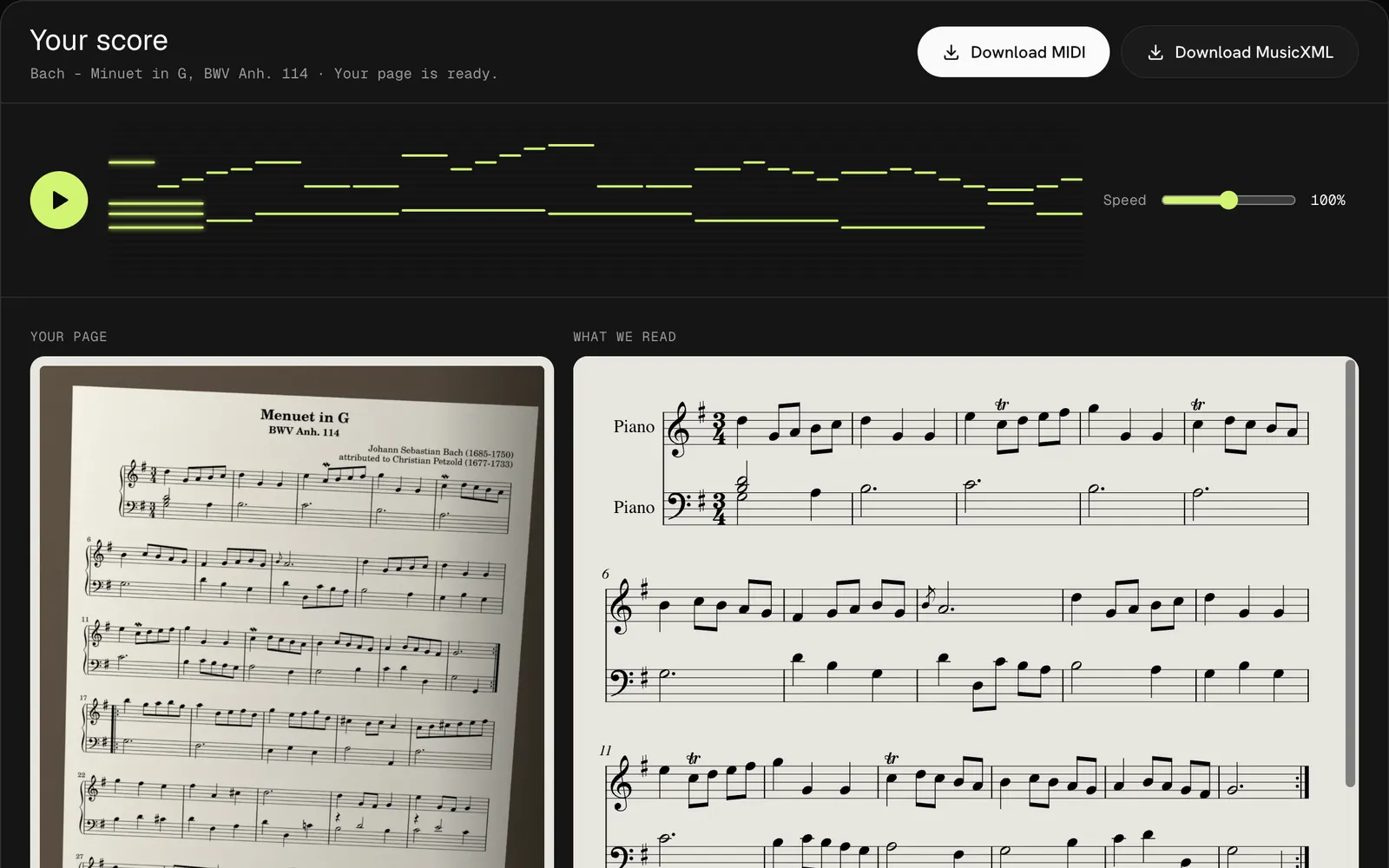
The sheet music scanner still reads pages shot at a slight angle or with a hand's shadow on one side. In our test, the tilted photo and the flat PDF gave note for note the same result.
Press play and the piano roll lights up note by note. Slow the scan down to 50% to hear a tricky bar, then bring it back to full speed.
Take the MIDI from the sheet music scanner to Synthesia, GarageBand or your keyboard's lesson mode, or open the MusicXML in MuseScore to fix a note.
Three steps from a printed page to music you can hear, with no sheet music scanner app to download first.
Lay the page flat in even light, hold the phone straight above it and fill the frame with the staves. On a phone, tap the sheet music scanner's upload box to open the camera.
Make sure it is the right page, then press Convert. The sheet music scanner takes about 20 seconds a photo.
Listen, compare the result with your photo, then download MIDI or MusicXML.
The sheet music scanner uses the same reader as our sheet music to MIDI converter, so print quality decides the result.
The sheet music scanner reads clear printed notation best, from a single melody line to a piano grand staff. Flatten the spine of a thick book so the staves near the middle stay straight.
A photo taken straight on in even light gives the sheet music scanner almost as much to work with as a flatbed scan. Our angled test photo with a shadow on one edge still matched the published notes exactly.
Handwritten manuscripts, guitar tablature and dense orchestral scores are not reliable yet. Expect missing or wrong notes, and play the result back first.
Small habits that help a sheet music scanner read more of your page.
Fill the frame with a single page. Two pages side by side make every note smaller and harder for the sheet music scanner to read.
Hold the phone flat over the page. A small tilt is fine, but a steep angle squeezes the staves furthest from the lens.
A normal phone photo fits easily. For a whole book, save the pages as one PDF of up to 20 pages and use PDF to MIDI instead.
Only you can see what you put through the sheet music scanner. Uploaded photos are deleted within 24 hours and results after 7 days, and we never use them to train recognition models.
FAQ
Your first 3 pages are free when you sign up, so you can scan three photos at no cost. After that each page is one credit, which works out to 20 to 33 cents a page with credit packs.
No. This sheet music scanner runs in the browser on iPhone, Android, tablets and computers. On a phone, tap the upload box and choose the camera to take the picture right there, with nothing to install.
Yes. When the sheet music scanner finishes, press play to hear the page with the notes lighting up on a piano roll. You can slow it to 50% or speed it up to 150%.
You can open the sample photo and hear its result without signing in. To scan your own pages you need a free account with 3 pages; the photo you picked stays selected while you sign up.
In our test, the phone-style photo gave exactly the same 204 notes as the clean PDF of the same page. Blur, glare and steep angles are what lose notes, so retake those photos.
Not reliably. It is built for printed staff notation. Handwritten manuscripts and tabs often come back with missing or wrong notes, and pages that fail are refunded automatically.
Point the sheet music scanner at a printed page and hear it in about a minute. Your first 3 pages are free.
Scan Sheet Music