Right Hand, Left Hand, Two Tracks
The treble staff becomes one MIDI track and the bass staff another, so a piano sheet to MIDI file lets you mute the right hand and drill the left alone.
Upload a PDF or photo of a piano piece and get the right and left hands back as two MIDI tracks, chords intact.
Your piano sheet to MIDI result, each hand on its own track
Every piano sheet to MIDI job reads both staves of each system, so the file sounds like the page and splits the way your hands do.
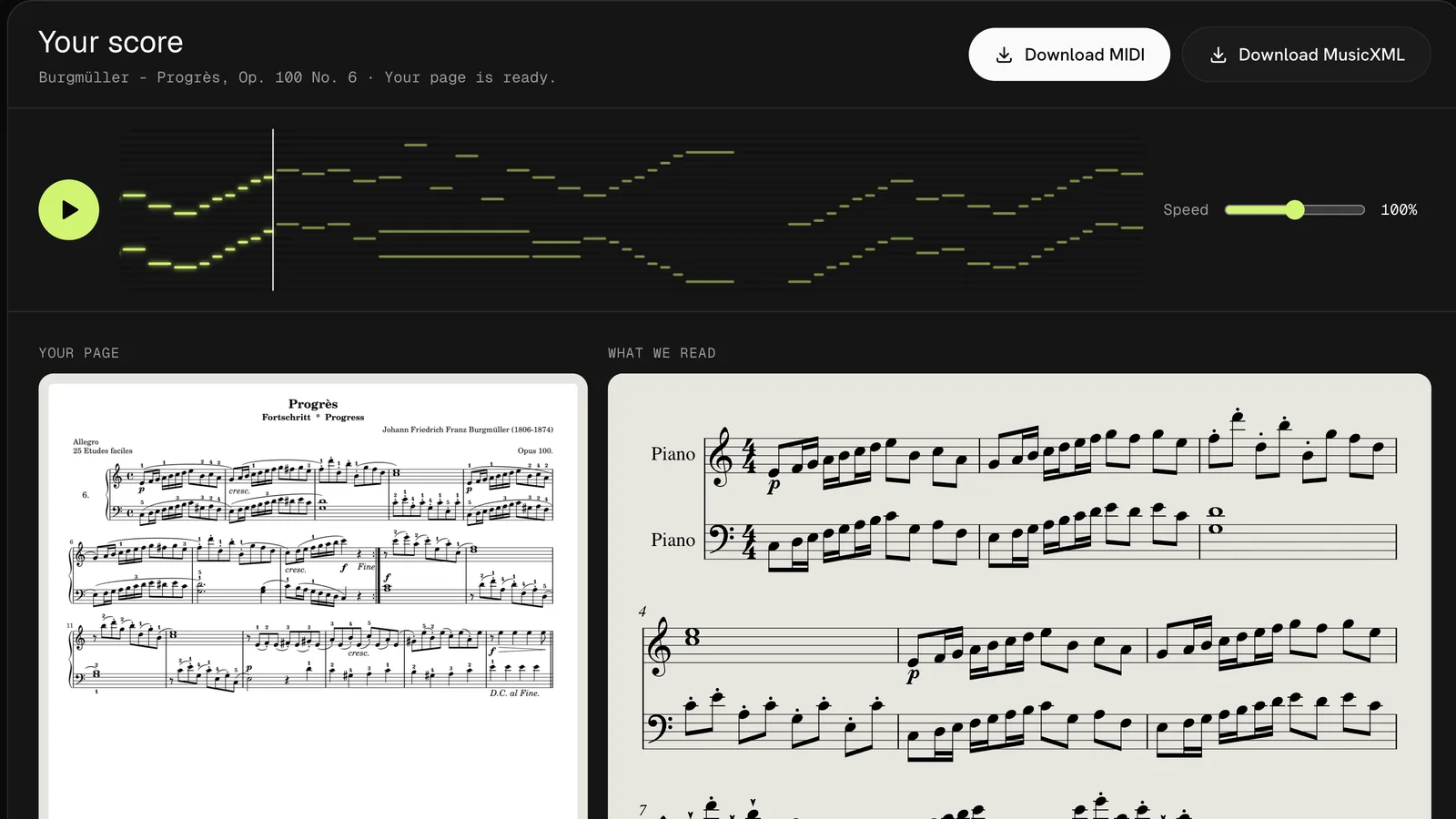
The treble staff becomes one MIDI track and the bass staff another, so a piano sheet to MIDI file lets you mute the right hand and drill the left alone.
Notes printed on one stem start together in the MIDI file. In our piano sheet to MIDI tests, every one of the 78 chords in three Burgmüller studies kept all of its notes.
Piano sheet to MIDI follows each braced pair of staves down the page and joins them bar by bar, so a study of several lines plays as one piece.
To convert piano sheet to MIDI you need no app and no plug-in, just a current browser on a computer, tablet or phone.
Drop a PDF of up to 20 pages or a JPG or PNG of up to 10 MB. A lesson-book page shot at the piano works too; our sheet music scanner page has camera tips.
Press Convert piano to MIDI. A page takes about 20 seconds, then play it back with both hands to catch a wrong note early.
Download the piano sheet to MIDI file with the hands on separate tracks, plus a MusicXML copy for notation apps.
It runs the same reader as our sheet music to MIDI converter, with the two-staff layout of piano music in mind.
Load the file into Synthesia or your keyboard's lesson mode. Piano sheet to MIDI turns the page your teacher handed you into a song those apps can light up, one hand at a time.
Convert piano sheets to MIDI once, then send each student the file with a note to mute one track. Slow hands-alone practice is the oldest trick in the studio, and this sets it up in a minute.
Drop the file into Logic, Ableton or GarageBand, then shape velocity and add the pedal by hand. Piano sheet to MIDI gives you the notes; the touch is still yours.
Four things our piano sheet to MIDI tests showed that the printed page and the MIDI file treat differently.
Pedal marks and finger numbers are not turned into sound in a piano sheet to MIDI file. Add sustain in your DAW, and keep the printed copy on the stand for fingering.
Every piano sheet to MIDI file plays at 120 beats a minute, whatever the tempo mark says. Progrès lasts 32 seconds at that speed; slow it in Synthesia or your DAW.
La Candeur and Arabesque came back with every note right, but one or two empty bars appeared at repeat signs. Delete them in your DAW so the hands stay in time.
In a Chopin nocturne the right hand's fast runs came back at 73% while the left hand kept 97%. Play those bars back before you practice them.
FAQ
Your first 3 pages are free when you sign up, and the Progrès sample plays without an account. After that each page is one credit, about 20 to 33 cents with credit packs.
Yes. Piano sheet to MIDI reads both staves on every page, chords come back as notes that start together, and two voices in one hand keep their own lines in the MusicXML. Dense, fast passages are where mistakes show up first.
Yes. Add the folder with your .mid file to Synthesia and the right and left hand appear as two tracks you can assign to each hand. Most keyboard lesson modes that read MIDI take the same file.
Yes. For piano sheet to MIDI from a photo, shoot the page straight on in even light with both staves of every line in frame. A phone photo of a lesson book is read the same way as a PDF.
A PDF of up to 20 pages comes back as one MIDI file with the pages joined in order. Our PDF to MIDI page shows a 3-page sonatina converted in one go.
No. A piano sheet to MIDI file holds the notes, their timing and the two hands. For markings, open the MusicXML in MuseScore, where dynamics stay printed in the score.
Drop a page, hear both hands play and save your piano sheet to MIDI file in about a minute. Your first 3 pages are free, and the sample needs no account.
Convert my piano sheet