
One Staff, One Track
Four staves in, four MIDI tracks out. In our music score to MIDI test of a string quartet, the viola and cello tracks matched the published notes in all 137 bars.
Upload a quartet or choir score as a PDF or photo, and music score to MIDI gives each staff its own track.
Your music score to MIDI result, one track for every part
Each music score to MIDI job reads every staff in a system and follows it down the page, so violins, viola and cello, or soprano to bass, land on their own tracks.
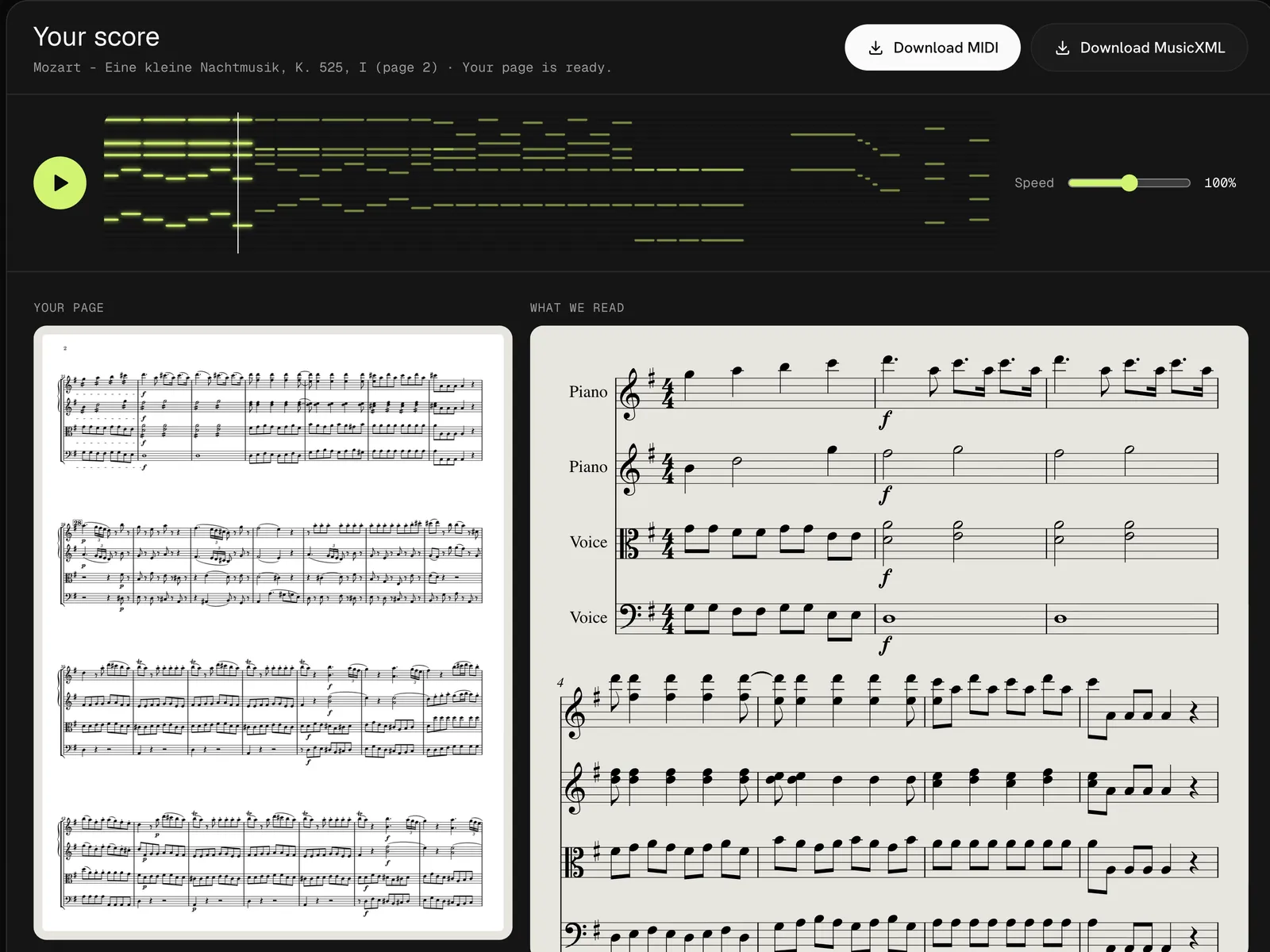
Four staves in, four MIDI tracks out. In our music score to MIDI test of a string quartet, the viola and cello tracks matched the published notes in all 137 bars.
Treble, alto and bass clefs are read staff by staff, so a viola line in alto clef lands at the right pitch in your music score to MIDI file. Key and time signatures carry through every page.
A five-page score comes back as one music score to MIDI file: page two's first violin picks up where page one's left off, bar after bar.
Music score to MIDI runs in the browser on a computer, tablet or phone, with nothing to install.
Drop a PDF of up to 20 pages or a JPG or PNG of up to 10 MB. Our PDF to MIDI page shows how to tick only the pages you need.
Press Convert score to MIDI, then play it back to hear every part together and catch a wrong bar early.
Download the music score to MIDI file with one track per staff, plus a MusicXML copy that keeps the parts for notation apps.
It runs the same reader as our sheet music to MIDI converter, applied to scores with several staves in each system.
Run a quartet through music score to MIDI and mute your own part to play along with the other three. Each staff is a separate track, so you can solo or silence any line in a DAW.
Convert an open choir score so each singer can hear their line alone. In our test the soprano, alto and bass came back right; check a tenor line written in the treble clef with a small 8.
Bring a public-domain score into Logic, Cubase or Ableton with the parts already split, then give each track the sound you want. Music score to MIDI does the typing; the orchestration is yours.
Four things our music score to MIDI tests showed about scores with several parts.
A treble clef with a small 8 below it sounds an octave lower. Our choir test read it as a plain treble clef, so shift that one track down 12 semitones.
A page that switches from four voice staves to a two-staff piano reduction mixes the parts up. Convert the pages with the open score, not the reduction.
Each music score to MIDI track holds notes with no instrument set, and every file starts at 120 beats a minute. Give each track its sound and tempo in your DAW.
In one busy line of our quartet test, the first violin staff was skipped and the second violin moved up a track for seven bars. Play the file through before you share it.
FAQ
Your first 3 pages are free when you sign up, and the Mozart sample plays without an account. After that each page is one credit, about 20 to 33 cents with credit packs.
Upload the full score. Each staff in a system becomes its own MIDI track, so a string quartet gives four tracks and an open choir score gives soprano, alto, tenor and bass.
Yes. A PDF of up to 20 pages comes back as one MIDI file with the pages joined part by part. Our five-page Mozart test came back as one 137-bar music score to MIDI file.
Yes. Shoot one page at a time, straight on, with every staff of each system in frame. The sheet music scanner page has photo tips.
It is built for scores of a few staves, such as quartets and choir scores. A full orchestral page with a dozen small staves is much harder to read, and we don't promise a clean result.
Not as sound. A music score to MIDI file holds the notes, their timing and the parts; trills play as the written note and repeats play once. The MusicXML keeps the dynamics and trill signs.
Drop a page, hear every part and save your music score to MIDI file with one track per staff. Your first 3 pages are free, and the sample needs no account.
Convert my score