Opens With File, Open
No plug-in and no import add-on: MuseScore opens the .musicxml file from File > Open. Our PDF to MuseScore test file opened and saved as .mscz in under 2 seconds.
Upload a sheet music PDF and PDF to MuseScore hands you a MusicXML file that opens with the notes, key and dynamics in place.
Your PDF to MuseScore file, ready to open in MuseScore
Every PDF to MuseScore job reads the notes, rhythms, clefs, keys and dynamics on the page and writes them into a MusicXML file that MuseScore opens like one of its own.
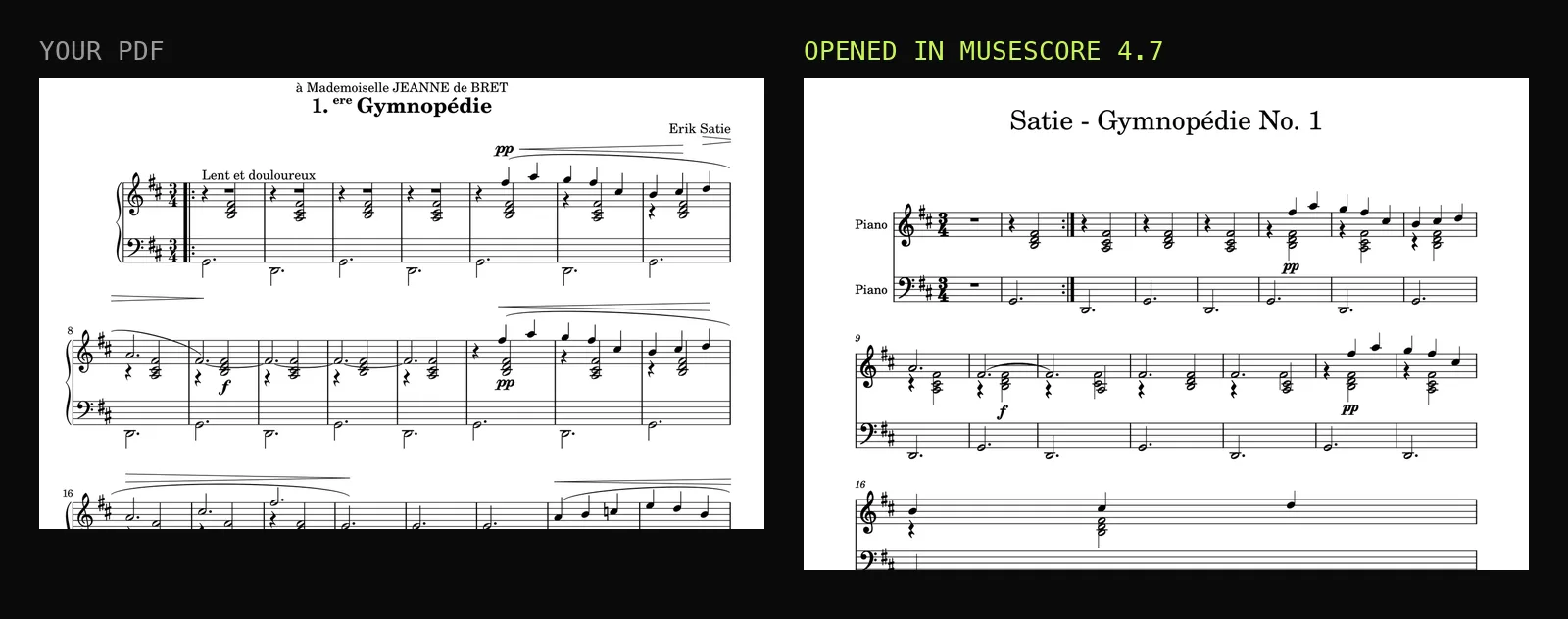
No plug-in and no import add-on: MuseScore opens the .musicxml file from File > Open. Our PDF to MuseScore test file opened and saved as .mscz in under 2 seconds.
PDF to MuseScore gives you real notes, so you can transpose, change the instrument or fix a bar instead of tracing over a scan.
PDF to MuseScore joins a PDF of up to 20 pages into one score, bar by bar. The 2-page Gymnopédie came back as a single 49-bar score.
PDF to MuseScore needs only a browser and the free MuseScore Studio app.
Start PDF to MuseScore by dropping a sheet music PDF of up to 20 pages, or a photo of one page. Tick only the pages you need; PDF to MIDI shows how page picking works.
Press Convert for MuseScore, check the redrawn score against your page, then download the .musicxml file. Our PDF to MusicXML page explains the format.
In MuseScore choose File > Open, pick the .musicxml file and save it as .mscz. Your PDF to MuseScore score now edits like any other.
Whatever you need a MuseScore import PDF for, it runs the same reader as our sheet music to MIDI converter.
Turn a public-domain PDF into notes with PDF to MuseScore, then transpose it, add parts or swap instruments in MuseScore instead of entering every bar again.
Use PDF to MuseScore to bring a piece in, enlarge it, add fingering or cut a passage for a student, then print a clean copy.
Before the file reaches MuseScore you can play it back in the browser at 50% speed and check the result by ear.
Four fixes our PDF to MuseScore tests showed you may still make by hand.
In Gymnopédie No. 1 every note was right, but the start repeat moved and the first-ending bracket was missing. Add them back from the Repeats & jumps palette.
In our Für Elise test the meter switched to 1/4 from bar 32 on. If bars suddenly look short, set the time signature again from that bar.
An empty bar can appear at the very start of a PDF to MuseScore score or at a repeat sign. Select it and delete it so the bar numbers match your PDF.
The two staves of a piano piece arrive as two parts named Piano. They play and print fine; rename them in the Instruments panel if you like.
FAQ
Your first 3 pages are free when you sign up, and the Gymnopédie sample plays without an account. After that each page is one credit, about 20 to 33 cents with credit packs.
MuseScore edits notes, not pictures, so a PDF has to be read first. MusicXML is the format MuseScore uses to take in notes from other programs, so the file opens with File > Open.
We tested MuseScore Studio 4.7. MuseScore 3 opens MusicXML files too, and so do Sibelius, Finale and Dorico if you switch programs later.
Yes. A straight, evenly lit phone photo of one page works; the sheet music scanner page has photo tips.
Notes, rests, ties, clefs, keys, time signatures, dynamics and staccato dots came across in our tests. Lyrics, slurs, fingering and tempo words did not, so add them in MuseScore.
About 20 seconds a page to read the PDF, then a second or two for MuseScore to open the file. A short piece goes from PDF to MuseScore within a minute or two.
Drop a PDF, check the result and open it in MuseScore within minutes. Your first 3 pages are free, and the sample needs no account.
Convert my PDF