Staves First, Then Symbols
Optical music recognition starts by finding every five-line staff and how the staves group into systems, then reads the symbols on each staff from left to right.
Upload printed sheet music and optical music recognition reads every staff into MIDI and MusicXML, with no software to install.
Your optical music recognition result: MIDI, MusicXML and playback
Optical music recognition finds the staves first, then the notes, rests, clefs, keys and meters on each one, and writes them out as a score a computer can play and edit.
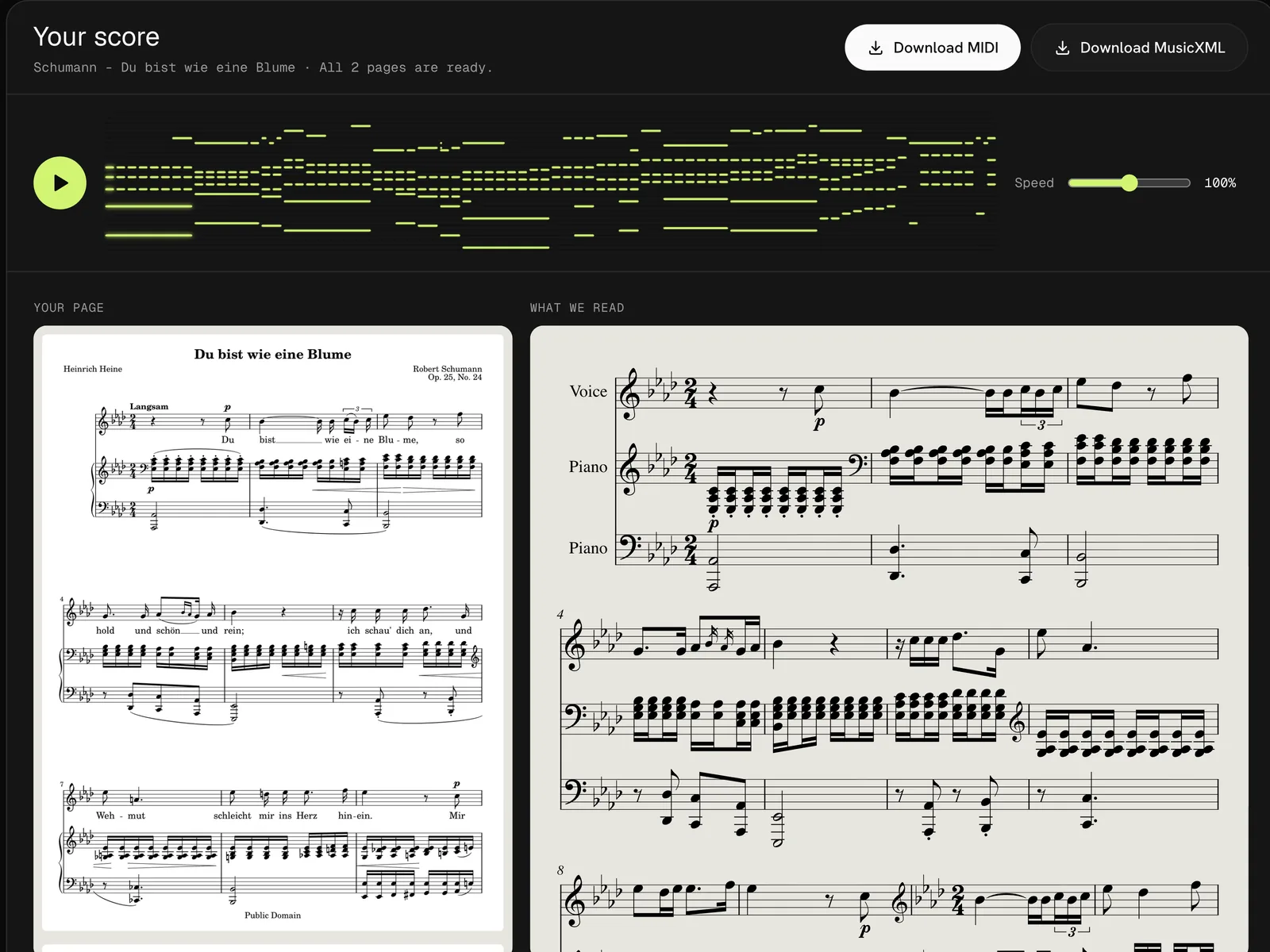
Optical music recognition starts by finding every five-line staff and how the staves group into systems, then reads the symbols on each staff from left to right.
A notehead only becomes a pitch once the clef and key signature are known. In our test the four flats of A-flat major held on both pages.
Voice and piano came back as three parts, so the MIDI has one track for the singer and one for each hand of the piano.
Optical music recognition online needs no install: just a browser and a clear page.
Drop a PDF of up to 20 pages or a phone photo of one page. Printed music from notation software reads best; for photos, the sheet music scanner page has lighting tips.
Press Read my sheet music. Optical music recognition takes about 20 seconds a page, and each page shows when it is done.
Compare the redrawn score with your page, use sheet music to audio playback to hear it, then download MIDI or the PDF to MusicXML file.
This optical music recognition runs the same reader as our sheet music to MIDI converter, so every result comes as MIDI and MusicXML.
Run optical music recognition on an art song or a choir score and the vocal line arrives as its own track, ready to play alone at half speed.
Turn a printed exercise into an editable file instead of copying it bar by bar, then enlarge, transpose or trim it after the PDF to MuseScore steps.
Digitize a public-domain edition with optical music recognition software and start arranging from real notes, not a picture of them.
Four limits we measured, so you know where to look first.
Sheet music OCR here reads notes, not words: the lyrics of Du bist wie eine Blume came back empty. Add the text in your notation app.
Dynamics and staccato dots carried over in our test (4 dynamics, 15 staccatos), but the slurs and the tempo word Langsam did not. Fingering is skipped too.
In our Gymnopédie No. 1 test every note was right, but a repeat sign moved and the first-ending bracket was missing. Check repeats before you trust the MIDI’s length.
This optical music recognition is trained on printed notation. Handwritten manuscripts and guitar tab come back with missing or wrong notes.
FAQ
Optical music recognition, or OMR, is software that reads printed sheet music the way OCR reads text. It turns the notes in an image into a file a computer can play and edit, such as MIDI or MusicXML.
No. Optical mark recognition reads filled-in bubbles on test forms. OMR software for music reads staves and notes, and that is what this page does.
Yes. Your first 3 pages are free when you sign up, and the Schumann sample plays without an account. After that each page is one credit, about 20 to 33 cents with credit packs.
On clean printed pages we measured 86% to 100% of notes right across 7 piano pieces, and 97.7% on the Schumann song here. Fast runs and ornaments are where errors gather, so listen once before you rely on a file.
A standard MIDI file with one track per staff, and MusicXML for MuseScore, Sibelius, Finale or Dorico, both from one page credit. The sheet music converter page compares the two.
Yes, if the page is flat, sharp and evenly lit. In our photo test, optical music recognition gave the same 204 notes from a tilted, shadowed photo as from the clean PDF.
Upload a PDF or photo and hear what the reader found within a minute. Your first 3 pages are free, and the sample needs no account.
Read my sheet music