
MIDI for Practice and DAWs
A .mid file with one track per staff. The minuet came out as a 1.7 KB file with two tracks and every one of the 130 notes in the published MIDI.
Upload printed sheet music once and this sheet music converter gives you MIDI, MusicXML and playback right in your browser.
Your sheet music converter results: MIDI, MusicXML and audio
Every sheet music converter job reads the page once and hands back three things: a MIDI file, a MusicXML file and a player in the browser.
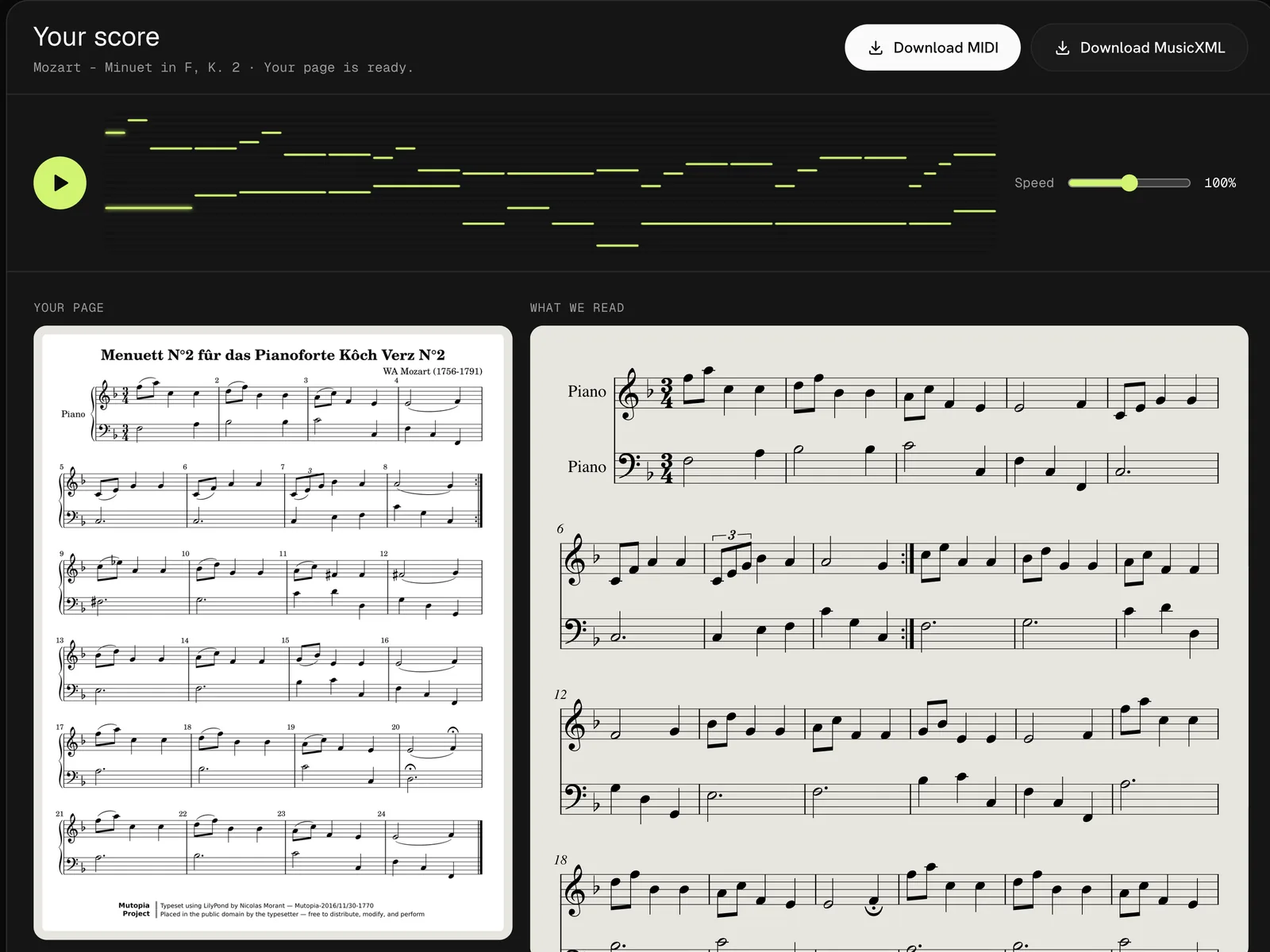
A .mid file with one track per staff. The minuet came out as a 1.7 KB file with two tracks and every one of the 130 notes in the published MIDI.
The sheet music converter’s .musicxml file, 36 KB for the minuet, that MuseScore, Sibelius, Finale and Dorico open with the notes, key and meter in place.
Play the result at 50% to 150% speed before you download anything; the sheet music to sound page shows the player.
Three steps from paper to files with the sheet music converter, in any browser.
Drop a PDF of up to 20 pages, or a JPG or PNG photo of one page. The sheet music converter joins the pages into one score, as on our PDF to MIDI page.
Press Convert sheet music. One run, about 20 seconds a page, makes every output, so you never pay twice for another format.
Download MIDI, MusicXML or both, or play the result first. Heading to MuseScore? Follow the PDF to MuseScore steps.
Pick the file by what you will do next. All three come from the same reader as our sheet music to MIDI converter.
Load the sheet music converter’s MIDI into a practice app or a DAW, mute the other tracks and loop your bars. Pianists can keep each hand apart with piano sheet to MIDI.
Open the sheet music converter’s MusicXML in a notation app to change the key, fix a bar or print parts. The PDF to MusicXML page lists what carries over.
Use the sheet music converter to audio mode: press play, slow it to 50% and learn the tune by ear before you open the book.
Four things people ask a sheet music converter for that this one does not do, and what to use instead.
This sheet music converter reads notes from a page. Turning a recording into sheet music is transcription, a different job that we do not do.
Output is MIDI and MusicXML. For tab or note names, open the MusicXML in a notation app and switch the staff type there.
The sheet music converter plays audio in the browser only. To keep an MP3, import the MIDI into GarageBand or any DAW and export it.
The MIDI plays at a steady 120 beats per minute, whatever the tempo mark says. Set the speed you want in the player or your DAW before you export audio.
FAQ
Your first 3 pages are free when you sign up, and the Mozart sample plays without an account. After that each page is one credit, about 20 to 33 cents with credit packs, and every format comes from that one credit.
Yes. This one runs in any modern browser on a computer, tablet or phone. On a phone you can take the photo right from the upload box.
No. It converts sheet music into files, not recordings into notes. Start from a PDF, a scan or a photo of printed music.
PDFs up to 20 pages and 25 MB, and JPG or PNG images up to 10 MB. Printed notation works best; handwriting and guitar tab are not supported.
The MusicXML keeps notes, rests, ties, clefs, keys, meters, dynamics and staccato dots. Lyrics, slurs and fingering are left out; optical music recognition explains why.
About 20 seconds a page, so a one-page piece is ready in well under a minute and a 20-page PDF in about seven minutes.
One upload to the sheet music converter, three results: MIDI, MusicXML and playback. Your first 3 pages are free, and the sample needs no account.
Convert my sheet music